How to Find Good First Issues on GitHub (2026 Guide)
Find good first issues on GitHub that actually get merged. A 6-step starter guide with issue search filters, curated aggregators, and GetMerged C-Rank telemetry for picking repos that welcome first-time contributors.
Contributing to open source is hot right now.
GitHub recorded its largest single month of first-time open source contributors ever in March 2025: 255,000 newcomers in four weeks (GitHub Octoverse 2025, retrieved 2026-08-12). Across the year, developers made 1.12 billion public contributions.
And yet most developers who want to contribute never send their first pull request.
Not because the code is hard. Because picking the wrong repository is. Star counts do not tell you whether a maintainer will review your PR in two hours or ghost you for nine months.
This guide gives you a repeatable six-step process to find good first issues on GitHub that actually get merged.
Key Takeaways
- In March 2025, GitHub hit a record 255,000 first-time open-source contributors in a single month; public contributions reached 1.12 billion (GitHub Octoverse 2025, retrieved 2026-08-12).
- A good first issue is small, well-documented, and pre-scoped by a maintainer. The
good first issuelabel is a useful signal, but labels are often misapplied, so always verify before you write code.- Merge rate and first-timer success are far better metrics than star counts. Welcoming repos average an 82% external merge rate, and the friendliest Python repos merge 100% of first-timer PRs.
- Use
github.com/<owner>/<repo>/contribute, filtered search queries, and GetMerged telemetry to pick repos with active reviewer teams.
Before You Begin
What you will need:
- A free GitHub account.
- Git installed locally (or GitHub’s web editor).
- Basic comfort with the terminal and one programming language (or documentation skills: many first issues need no code at all).
- Time: 2 to 3 hours for the whole flow, most of it waiting between PR and review.
- Difficulty: Beginner.
A quick clarification before step one: a good first issue is not just any open issue in a famous repo.
GitHub’s own definition is precise: good first issues are tasks a maintainer has explicitly flagged as suitable for newcomers (GitHub Blog, retrieved 2026-08-12).
Practically, a good first issue should be small enough to finish in a few focused sessions, specific enough that you know exactly which file to touch, and safe enough that a mistake will not break production.
Step 1: Learn what separates a good issue from a trap
By the end of this step, you will be able to recognize a genuinely beginner-friendly issue within 30 seconds, and skip the thousands of misleading ones.

The hard truth: the good first issue label is applied inconsistently across open-source projects.
Academic research studying GitHub datasets found that manually labeled issues are frequently too complex for newcomers (ACM / ICSE 2022, retrieved 2026-08-12). A label is a hint, not a guarantee.
Read an issue with these four filters in mind:
- Scope: The fix touches one file or one isolated module, not a core architectural redesign. Look for phrases like “update README”, “add test case for”, or “fix edge case in parser”.
- Direction: The issue links to a specific file or function and states the expected behavior. Vague issues like “we should refactor the auth system” are traps. They need high-level design debates, not a first contribution.
- Mergeability: The project regularly merges small external pull requests. Check the repo’s closed PR tab: do outside contributors get reviews and merges, or do PRs sit unmerged for months?
- Mentorship: Comments are warm, maintainers answer questions, and the tone is welcoming. Cold, gatekeeping repositories drain the fun out of contributing.
If an issue fails more than one filter, move on. There are hundreds of thousands of open issues. Scarcity is not the problem; selection is.
Step 2: Use GitHub’s built-in discovery paths
This step gets you a working shortlist in ten minutes with nothing but GitHub itself.
- If you already have a project in mind, visit
github.com/<owner>/<repo>/contribute. For example, github.com/nodejs/node/contribute lists curated beginner issues with suggested files. - If you do not know a project, start from topics you use every day:
github.com/topics/<topic>andgithub.com/exploresurface active repositories with beginner backlogs. - Browse the dedicated Issues -> “Good first issue” tab that larger repositories maintain as permanent filters.
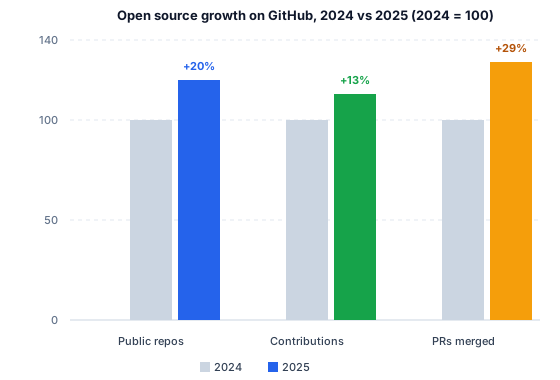
Why this is worth your time: public repositories grew from 330 million in 2024 to 395 million in 2025 (+20%), and merged pull requests jumped 29% to 518.7 million (GitHub Octoverse 2025, retrieved 2026-08-12). The demand for contributors is real.
Step 3: Filter GitHub issues with precision queries
Built-in search is great. But precision query qualifiers allow you to cut a 4,000-issue backlog down to a shortlist you can read over coffee.
Start with these parameters:
is:issue is:open label:"good first issue" no:assignee language:pythonKey qualifiers explained:
is:open: Only open issues.no:assignee: Nobody is currently working on it (prevents duplicated effort).label:"good first issue": Sibling labels to try includelabel:"help wanted",label:"beginner-friendly", andlabel:"first-timers-only".language:python(orgo,rust,typescript): Filter by your preferred language.archived:false: Exclude dead, unmaintained repositories.
For a language-wide search sorted by community interest:
is:issue is:open label:"good first issue" no:assignee language:rust sort:reactions-+1Step 4: Use GetMerged to pick repos that actually merge PRs
Here is where beginners lose weeks.
They find a massive 40,000-star repository, open a great issue, write a clean PR, and it sits unreviewed for two months. The project was not dead; the review pipeline was.
This is the exact problem GetMerged solves.
GetMerged is a precision telemetry index that scores public repositories with an objective C-Rank™ grade (Tier S to D). It evaluates external PR merge rate, maintainer response velocity, active maintainer count, and first-timer conversion.
Internal PRs from organization members are excluded, so the numbers show what an outside contributor actually experiences.
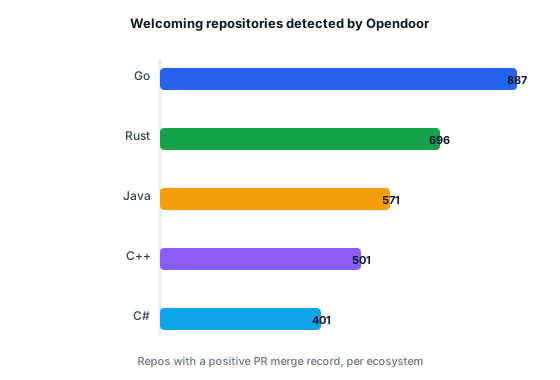
Open the GetMerged Good First Issues Explorer, filter by your language, and inspect real maintainer stats:
- microsoft/vscode: A legendary repository with hundreds of open beginner issues, but a 28.7% first-PR success rate and a response backlog (GetMerged telemetry, retrieved 2026-08-12). You will learn a lot, but you may wait weeks for review.
- TylerYep/torchinfo: 100% external merge rate, 100% first-timer success, and median review turnaround within 3 hours (GetMerged).
- cogent3/cogent3: 100% merge rate, with first review in under an hour.
Same labels, completely different outcomes. Stop choosing repositories by star count and start choosing by merge probability.
Step 5: Vet the repository before you write code
Before opening your IDE, run through this five-minute checklist:
- License: A valid OSI-approved LICENSE file exists. Without one, you have no legal basis to contribute.
- Active Pulse: Recent commits on the default branch in the last 30 days.
- Contributing Guidelines: A
CONTRIBUTING.mdexists with test and branch rules. Only 5.5% of GitHub repositories ship contributor guides (GitHub Octoverse 2025, retrieved 2026-08-12). Projects that document their contribution flow genuinely want outside contributions. - Reviewer Warmth: Recent newcomer PRs received constructive, polite feedback instead of gatekeeping.
- Stack Comfort: You actually enjoy working with this technology stack.
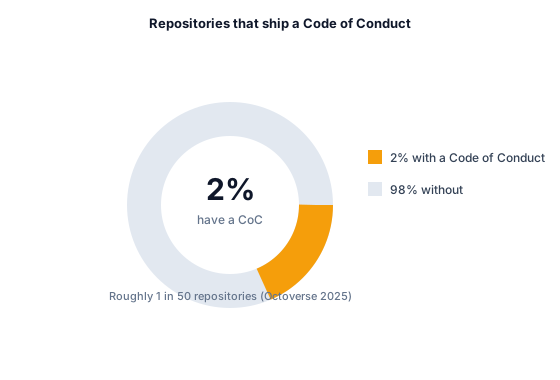
Read CONTRIBUTING.md before writing code. It explains how to run local tests, branch naming rules, and commit message formats.
Step 6: Claim the issue and ship your pull request
- Claim the issue: Leave a comment: “I would love to work on this issue.” This prevents multiple developers from duplicating work.
- Fork and clone: Fork the repo to your GitHub account and clone it locally. Create a dedicated feature branch (
git checkout -b fix/issue-title). - Make the minimal required change: If the issue asks to fix a typo or add a test, touch only those lines. Avoid refactoring unrelated files.
- Run tests locally: Ensure all test suites and linters pass before committing.
- Open upstream pull request: Open the PR against the main upstream branch. Reference the issue in the description (
Fixes #1234) and outline what you changed. - Respond to review feedback: Maintainers are often busy volunteers. If they request changes, address them promptly and push updates to the same branch.
Once merged, GitHub automatically adds you to the repository’s contributor wall. Your name now lives in the project’s commit history.
Summary
Finding your first open-source contribution should not feel like playing the lottery.
Use precise GitHub search filters, verify project health, check maintainer response telemetry on GetMerged, and start with small, focused fixes.
Your first merged pull request is just one good issue away.